Why do we need an operating system?
Module 12 is the last leg of this course, and it changes the question. For eleven modules we have asked: how do we write a program in OCaml that is safe, correct, and reasonably fast? In this final module we ask: if a language really delivers that level of safety, what falls out if we push it down into the operating system itself? Could the OCaml runtime be the runtime of a server, with no Linux underneath?
The answer, by the end of the module, is yes: that is exactly what MirageOS does. ("Unikernel" is the name for the kind of artefact MirageOS produces: a single binary that contains the application and the operating-system pieces it needs, bundled together as one unit. The next lecture defines it carefully; for now, treat it as shorthand for "what we are building toward.") But to get there we first have to understand what an operating system actually is, why monolithic kernels are so large, and where the security cost of that size lives. This first lecture sets up the problem the rest of the module solves. It is deliberately high-level: no OCaml code, no live cells, just the architectural picture of where today's software runtime actually sits and why that matters for safety.
This lecture has three parts. First, what an OS is for: the abstraction over hardware and the management of resources. Second, the stack picture: the layers of code your program quietly sits on top of every time it runs. Third, the size of those layers in the production-grade kernels we use today, and the security argument that follows from that size.
What an operating system is for
The job of an operating system is very small to state: support running applications. Everything else in the OS exists because that job, taken seriously, is much harder than it looks.
Two things make it hard. The first is stability: the OS is deployed long before any of the applications that will eventually run on it. When Linux ships a kernel release, the developer who will eventually run a Python web server, a video transcoder, and a database on that release has not even written the first line of any of those programs yet. The OS has to commit to a stable interface that those future applications can target. The second is scalability across hardware: the same OS has to work on a desktop today and on a phone tomorrow, across a dozen CPU architectures, hundreds of network card models, thousands of disk controllers. The OS cannot ask the application developer to rewrite the application for each new hardware device. It has to absorb that diversity behind a stable interface of its own.
The way OSes deliver on those two requirements is by providing an abstraction over the hardware. The abstraction has two components, and it is worth naming them separately:
- Drivers for different hardware devices. The OS knows how to talk to a particular brand of network card; the application does not. The OS exposes a uniform "network" API (sockets, in the case of POSIX), and the application uses that API regardless of which card is physically installed.
- Resource management: deciding who gets the CPU when, how much memory each process can use, who can read which files, which process owns which network connection. The OS arbitrates among competing programs for finite resources.
The picture is the classic hourglass: many applications above, many devices below, the OS as the one layer both sides agree on.
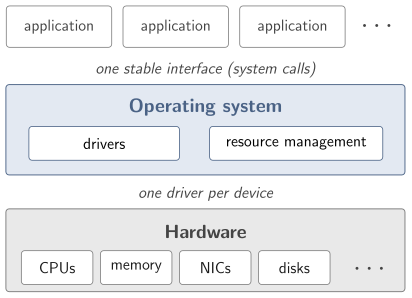
Both of these are deeply useful. Both come at a cost: every byte of driver code, every line of scheduling logic, every bit of resource- arbitration policy, is code your application is running on top of even when the application itself is tiny. Most of the runtime of a modern application is not the application; it is the OS.
What an OS is for
- Stability: applications come and go.
- The OS commits to an interface long before the apps exist.
- Scalability: one OS, many CPUs and devices.
- Apps cannot be rewritten per device.
- It delivers both by abstracting the hardware:
- drivers for each device.
- resource management: CPU, memory, files, users, network.
- Application code is a small percentage of the runtime.
The stack picture
When you type ./hello-world and press enter, your two-line program
runs on top of a stack of software that is mostly invisible to you.
Reading from the application down, the layers are:
- Application. Your code. Usually the smallest layer.
- Configuration files. Settings the application reads on startup.
- Language runtime. For a C program this is
libcplus the thread library and the dynamic loader. For Java it is the JVM. For Python it is the CPython interpreter. For OCaml it is the OCaml runtime (the GC, the I/O wrappers, the FFI stubs). - Shared libraries. OpenSSL for TLS, the C math library, perhaps a database client library, all linked dynamically at process start.
- Kernel. Linux, Windows NT, or XNU on macOS. Schedules processes, manages memory, drives devices, brokers system calls.
- Hypervisor. On a cloud VM, this is the layer that lets many guest OSes share the physical machine: KVM, Xen, Hyper-V. On a bare-metal install you can skip this layer mentally; on every cloud provider on the planet, it is there.
- Firmware. The boot ROM and microcode burned into the hardware that wakes up first when you press the power button.
That is six layers of other people's code between your printf and
the silicon. Each layer was written by a different community at a
different time with different goals. Each adds its own assumptions,
its own bugs, and its own attack surface.
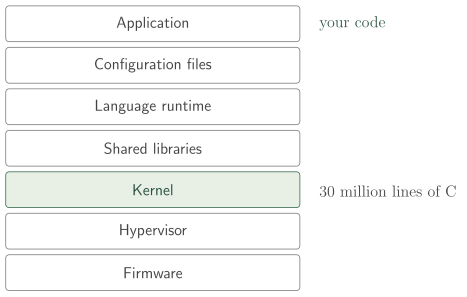
The kernel sits in the middle of that stack as a single highlighted box; the Torvalds 1992 quote at the end of this lecture is about exactly that box. The slide-mode table below is the same picture for screen-reader access.
If you draw that stack as a vertical column with your application at the top and the firmware at the bottom, the visual picture is clarifying: the green slice at the very top, the part that you actually wrote and want to run, is overwhelmingly outnumbered by the gray below it. The "iceberg" metaphor is apt and we will return to it later in this lecture: the code you want to run is the tip; the code your operating system insists you need is the giant mass underwater.
How big is the kernel?
Modern monolithic kernels are large. Very large. The Linux kernel 5.11 source release contained roughly 30.14 million lines of code. Windows is widely reported to be in the neighbourhood of 50 million. For context, the entire codebase of a complex commercial product like Adobe Photoshop is in the low millions of lines; Linux is an order of magnitude bigger than that, and Windows is bigger still.
It is instructive to look at what fills those 30 million lines. If
you break Linux down by subdirectory, an overwhelming proportion of
the bulk is in drivers/. That single directory accounts for around
60 percent of the entire kernel. The plot looks like a steady upward
march from version to version, with the drivers/ band growing
faster than anything else. Networking, filesystems, the core
scheduler, memory management, the architecture-specific layers, the
crypto subsystem: all combined, they are still less than half of the
total. Drivers dominate.
This is not because drivers are particularly complicated. It is because there are so many of them. Every USB device ever shipped, every wireless chipset, every legacy parallel port, every storage controller, every camera, every GPU, every keyboard variant, every networking ASIC, every BIOS variant on every laptop manufactured since the early 1990s: each one has a driver upstream. The kernel carries them all so that any user, on any machine, can boot Linux and have everything Just Work.
TCB growth over time
The size of the kernel is not stable; it grows. The kernelstats
project plots lines-of-code across Linux versions back to 2.4
(early 2000s) and the curve is monotonically up. The 2.4 series
sat around 3 to 4 million lines. 2.6 doubled it. 3.x doubled it
again. By the 4.x series the kernel was around 20 million; by
5.x it crossed 30, and the 6.x series has kept climbing. The
drivers/ band grew the fastest of all.
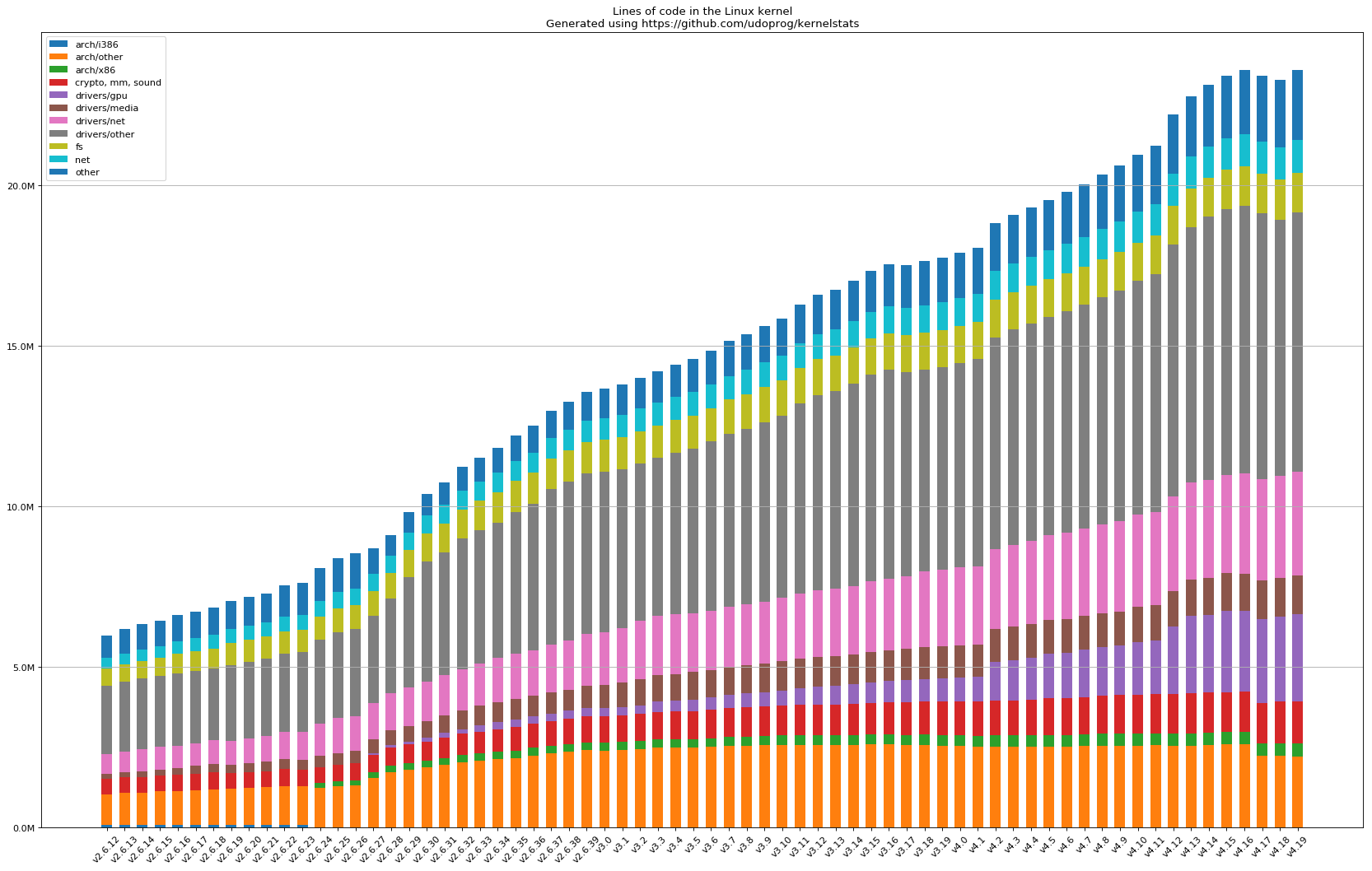
The stacked bands are the kernel's subsystems; the broad gray and
pink mid-section is drivers/, swallowing the rest of the chart a
little more with every release.
The curve has two readings. The first is the optimistic one: more drivers means Linux supports more hardware, which is useful. The second is the security one: the Trusted Computing Base you run every day is also growing monotonically, with no upper bound in sight, and every new line is a candidate location for a CVE (a publicly catalogued security vulnerability).
The TCB keeps growing
- The TCB (Trusted Computing Base, from the memory-safety module): all the code your security depends on.
- Linux 2.4 (early 2000s): 3 to 4 million LoC.
- Linux 5.11: 30 million.
- the 6.x series keeps climbing.
drivers/is the fastest-growing band.- More hardware support comes with more TCB.
TCB attack surface
The slogan is short: more code in the TCB means more bugs in the TCB means more CVEs. The conversion factor between "lines of C" and "CVEs per year" is not precise, but it is positive. Every new driver brings new pointer arithmetic, new lifetimes to track, new buffer boundaries to honour. Even when each individual line is well-reviewed, the total attack surface grows mechanically with the codebase.
You have seen the empirical evidence already: the memory-safety module opened with exactly these numbers. Roughly 70 percent of high-severity CVEs in major C/C++ codebases are memory-safety bugs (Microsoft 2019, Chromium 2020); 76 percent of Android's 2019 vulnerabilities (Google, 2022); and the ratio has been flat for a decade despite enormous investment in static analysis, fuzzing, and sandboxing. One more datapoint joins them here: by Fish in a Barrel's count, around 80 percent of the exploited 0-days from 2014 to 2019 were memory-safety bugs.
What this lecture adds is the TCB reading of those numbers. The mechanism is simple: more memory-unsafe C in the TCB, more memory-safety CVEs out the other end. And the previous section showed the TCB only ever grows. The background lecture returns to the same numbers as an argument about languages.
More code in the TCB means more CVEs
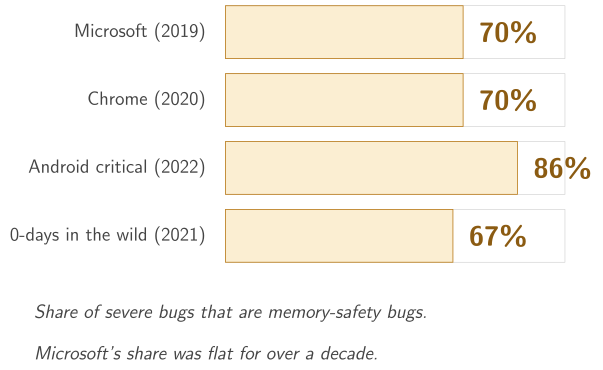
- The memory-safety module's opening numbers, recalled.
- Plus: ~80% of exploited 0-days, 2014 to 2019 (Fish in a Barrel).
- More C in the TCB = more memory-safety CVEs.
- the TCB grows monotonically; the CVE rate keeps pace.
A worked trace: serving one HTTP request
The "what does the OS do?" question is easiest to feel as a trace. A static-file web server gets one HTTP request. What kernel services does the request touch before the response goes back out on the wire? At minimum:
- The TCP/IP stack accepts the connection (one
accept). - The scheduler picks the server process from the run queue.
- The page-table layer maps the request buffer into the process's address space.
- The VFS (virtual filesystem) layer routes a
readto the page cache, which (on a cache hit) hands back the file contents without a disk touch. - The TCP/IP stack frames the response, the network driver pushes packets onto the wire.
- The scheduler suspends the process while it waits for the next request.
Every one of those bullets is thousands or tens of thousands of lines of kernel C. Your server's own code is a few hundred lines of bookkeeping. The ratio of "your code" to "OS code touched per request" is on the order of 1 to 10,000.
It is also instructive to listen to what Linus Torvalds said about this back in 1992, when Linux was new and people were arguing about microkernels versus monolithic kernels on the comp.os.minix newsgroup. Defending the monolithic design choice for Linux, he wrote:
True, Linux is monolithic, and I agree that microkernels are nicer. As has been noted (not only by me), the Linux kernel is a minuscule part of a complete system: Full sources for Linux currently run to about 200kB compressed. And all of that source is portable, except for this tiny kernel that you can (provably: I did it) re-write totally from scratch in less than a year without having any prior knowledge.
Linus Torvalds, 1992
In 1992 the kernel was 200 KB compressed. Over three decades later, the compressed source tarball is around 140 megabytes, roughly seven hundred times larger, and it unpacks to 30 million lines. The kernel itself is no longer a "minuscule part" of anything. It is the largest single component of the stack by an enormous margin, and most of that bulk is drivers for hardware that the average production server will never touch.
The monolithic iceberg
The mental picture from this lecture is the monolithic OS iceberg. Above the waterline, glinting in the sun, is the small piece you can see: the code you actually want to run. Below the waterline, sprawling and dark, is the much larger mass you cannot see: drivers, scheduling, paging, filesystems, network stacks, all the parts of the kernel and the userspace libraries that your runtime quietly depends on, almost none of which you ever asked for.
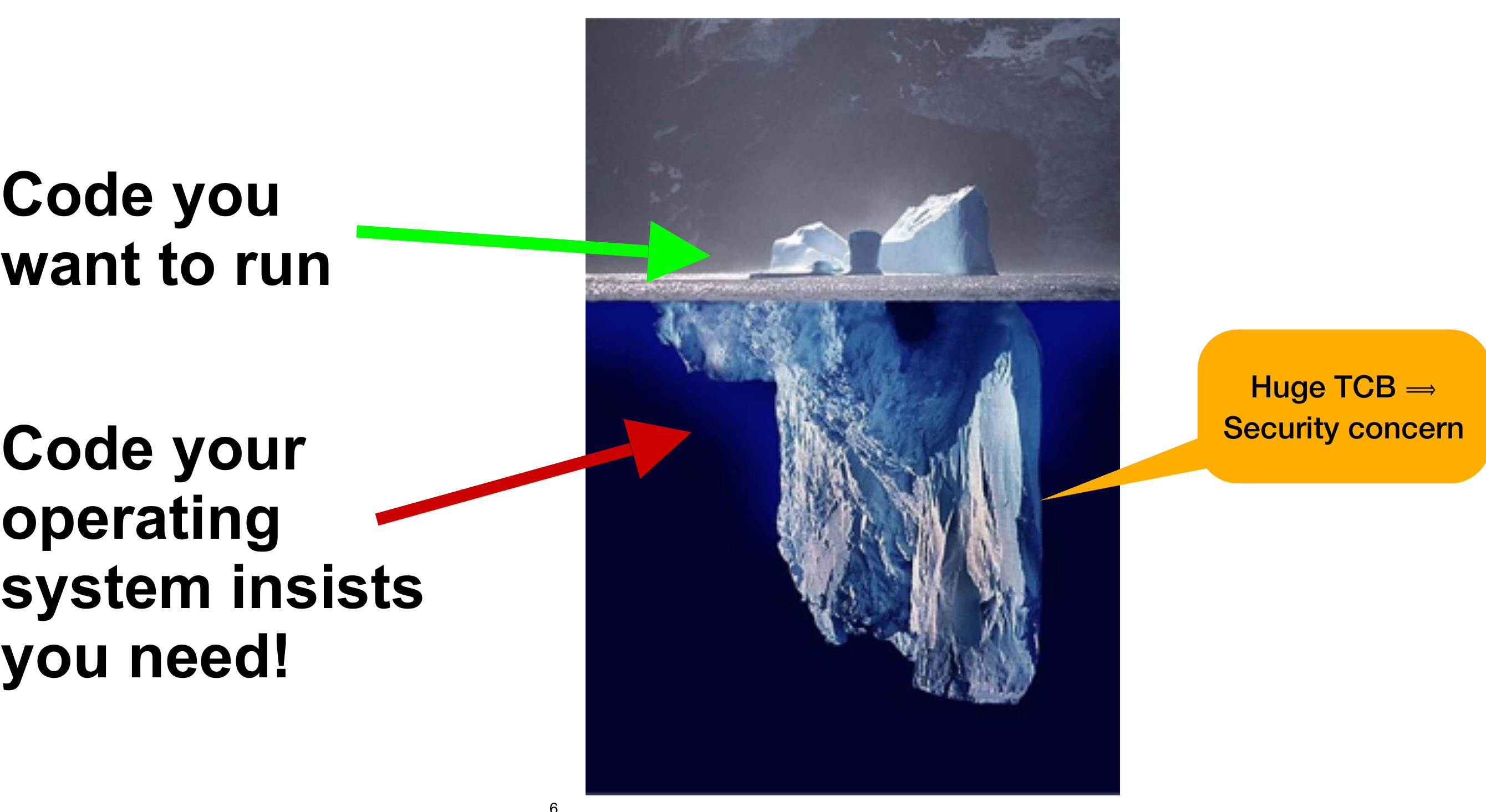
A vertical scene: at the top, two small chunks of ice break the surface, labelled "code you want to run". Below the water, the iceberg extends downward into shadow, labelled "code your operating system insists you need". Off to one side, an annotation: "huge TCB means security concern".
That last annotation is the point. The Trusted Computing Base, or TCB, is the set of components your security argument depends on. If any piece of the TCB is broken, the security of the whole system is broken. For a typical modern server, the TCB includes the firmware, the hypervisor, the kernel, the language runtime, every shared library the application links against, and the application itself. The application is the smallest piece. The kernel is the largest. And every line of code in the TCB is a line that, if compromised, can defeat the whole stack.
We will see in the background lecture that the proportion of CVEs that come from memory safety bugs in TCB-level C code has been stuck at around 70 percent for over a decade, across multiple major vendors. The size of the TCB matters, because every line of memory-unsafe code is a possible CVE.
The monolithic OS iceberg
- Visible: a few thousand lines of your code.
- Invisible: tens of millions of lines of someone else's code.
- All of it is in your Trusted Computing Base.
- Huge TCB means a huge attack surface.
What "could be different" looks like
The question this lecture leaves you with is: do we have to ship all of that infrastructure, every time, for every application? When you deploy a static HTTPS server that handles HTTP, TLS, and a single network card, does it really need 60 percent of Linux's 30 million lines of driver code that it will never invoke? Does it need a filesystem layer if it never touches a disk? Does it need a multi-process scheduler if there is only one process? Does it need a keyboard driver on a server that has no keyboard?
The answer, intuitively, is no. The answer in practice, today, is yes, because that is how monolithic OSes are sold and deployed: as one indivisible blob that you take or leave. The rest of this module is about how to build a different kind of system, where each application ships only the OS code it actually needs, and where the language itself enforces safety at the layers that used to be C.
We will get there with three ingredients, prepped together in the next lecture:
- The library OS: break the kernel into libraries. No ambient kernel; the application links the parts of the kernel it actually uses.
- Virtualisation: use the hypervisor to provide the protection boundary that a library OS cannot.
- The language: use memory-safe OCaml at the OS layer so the TCB stops being the world's biggest pile of C.
The synthesis is MirageOS. The closing walkthrough builds one small unikernel end to end, from source to running VM.
Activity
A static HTTPS web server, deployed in production, talks HTTP and TLS
over a single virtual network interface. It reads its TLS certificate
and a few static files from a bundled archive. It does not need a
filesystem, a USB stack, a graphics driver, a keyboard, a printer
subsystem, or 99 percent of the other drivers in drivers/ in the
Linux kernel.
On a typical cloud Linux VM, what fraction of the kernel code is actually exercised at runtime by this server?
- All of it; the kernel only loads code that is in use.
- Roughly half, because the network stack is large.
- A small fraction; most kernel code is unused.
- None of it; a static server bypasses the kernel.
Why: the kernel ships as one indivisible blob; even unused drivers are compiled in or loadable on demand, and the network stack, paging, scheduler, and core subsystems are all present. But the vast majority of the code, including most drivers and subsystems, is never executed by a workload like this. The mismatch between what the kernel contains and what the workload uses is the iceberg problem this module is set up to solve.
Which of the following is the strongest reason to care about the size of the kernel's Trusted Computing Base?
- Larger kernels are slower to start up.
- Larger kernels consume more disk and memory on every deployment.
- A larger TCB exposes more memory-unsafe code.
- Larger kernels have worse documentation.
Why: boot time and disk are real concerns but secondary. The fundamental security argument is that the TCB is what your security depends on; if any line of it is buggy in a way an attacker can exploit, the whole system can be compromised. Around 70 percent of CVEs in major C/C++ codebases are memory-safety bugs (we cover this properly in the memory-safety module and later in this module). A bigger TCB written in an unsafe language means more places for those bugs to live.
Show reference solution
Q1: a small fraction. Most of a monolithic kernel is unused by any single workload, yet all of it sits in the workload's TCB whether used or not.
Q2: every line of the TCB is a potential vulnerability, and most of the kernel is memory-unsafe C; the bigger the TCB, the more CVEs. Together the two answers are the case for smaller, more bespoke systems, which is where this module is headed.
Common pitfalls
Pitfall 1: "If the kernel is so big, why do we use it?" Because the kernel solves real problems: stability across applications, scalability across hardware, multi-tenant resource management. The question is not whether we need something doing the kernel's job; it is whether the one-size-fits-all monolithic blob is the right shape of that something for every workload. For a multi-user desktop or a Linux server hosting many applications, yes. For a single-tenant appliance, maybe not.
Pitfall 2: "Microkernels solve this." Microkernels (Mach, L4, Hurd, seL4) are an old idea that pushes most of the kernel functionality into user-space servers, leaving only a small "kernel" core. Their designs are clean, and one (seL4) is formally verified. They have also not displaced monolithic kernels in the commercial market, for reasons that are partly technical (cross-server IPC overhead) and partly social (drivers and applications are written for monolithic ABIs). MirageOS takes a different approach: not a smaller kernel, but no separate kernel at all, with the protection boundary provided by the hypervisor.
Pitfall 3: "Just use a container." Containers share the host kernel. Every container on a Linux host is exposed to every kernel CVE on that host. Containers reduce deployment friction without reducing the TCB. They are a packaging story, not a safety story. Tellingly, Docker itself acquired Unikernel Systems, the Cambridge company behind much of the MirageOS tooling, in 2016: an acknowledgement from inside the container world that there was a real idea here worth owning.
What's next
The next lecture preps all three ingredients of the recipe: the kernel broken into libraries (and the two cons that come with that), the hypervisor that restores protection and absorbs the drivers, and the language that guards the inside of the image. After that, the module is hands-on: MirageOS itself, then one unikernel built end to end.
Reading
- mirage.io, the MirageOS project home page: https://mirage.io/
- kernelstats (the project the LoC plots in this lecture come from): https://github.com/udoprog/kernelstats
- Linus Torvalds, 1992 Usenet posting on monolithic kernels (the full thread is on Tanenbaum's archived debate page; multiple archives exist).
Sources
This lecture's prose, worked examples, and quizzes are original to
this course, and the narrative arc (kernel size, monolithic iceberg,
"how do we reduce the complexity") is lifted from KC
Sivaramakrishnan's January 2025 IIT Madras talk Towards smaller,
safer, bespoke OSes with Unikernels, slides 3 to 7. The Linus
Torvalds 1992 quote is from the public Tanenbaum-Torvalds
comp.os.minix debate and is widely reproduced. Linux LoC figures are
from kernelstats; the Windows figure is from public reporting. See
LICENSES.md
at the repository root for the full source posture.