Suresh the Stationmaster: a worked unikernel example
The previous lecture walked you through what
MirageOS is, what its compiler pipeline does, and what libraries
ship with it. This lecture is the companion: one small unikernel
walked end to end, from the unikernel.ml you write through the
build commands you run to the running VM that serves a request.
The example is a unikernel I will call Suresh the Stationmaster:
a small "next-train" enquiry service invented for this course as a
worked example. The shape of the service is simple: an HTTP
endpoint that, when you hit it with curl, returns a one-line text
answer telling you when the next train departs and for where. The
point of the example is not the timetable; it is to see exactly
what files are involved when you turn a plain OCaml file into a
running unikernel.
This lecture has five parts. First, the problem statement (what
Suresh does and what we want from it). Second, the application code
itself. Third, the config.ml manifest that wires Suresh to the
MirageOS libraries. Fourth, the actual mirage configure,
dune build, and solo5-hvt invocations that produce and run
the image. Fifth, the resulting footprint and a glance at what
"real" production would add.
The problem
The premise is operationally tiny. You want a service that:
- Listens on TCP port 8080.
- Answers
GET /with a single line of plain text: "Next train to Chennai Central: 14:20." - Is deployable as one self-contained artefact that you can start on any Linux+KVM host without installing libc, OpenSSL, Python, or anything else.
- Boots in a fraction of a second and uses a few megabytes of RAM.
- If it crashes, it just exits, and the host's deployment system starts a fresh one.
That is the operational target. You can imagine this is the status endpoint behind a small "next train" board on a station's website, or a worked teaching example in a MirageOS tutorial. It is small enough that a single OCaml file can hold the application logic, but big enough that all the moving parts of a MirageOS build are exercised.
unikernel.ml: the application
The MirageOS unikernel is itself a functor parameterised over the platform-provided modules. For Suresh, the platform piece we care about is the network stack: we ask for an HTTP server, and the build wiring will plug in the right implementation for the chosen backend.
The application body (lightly elided to fit on a slide) is:
module Suresh (Http : Cohttp_mirage.Server.S) = struct
  let next_train_text =
    "Next train to Chennai Central: 14:20."

  let handler _conn _req _body =
    Http.respond_string
      ~status:`OK
      ~body:next_train_text
      ()

  let start http =
    let port = 8080 in
    let server = Http.make ~callback:handler () in
    http (`TCP port) server
end
A few things to notice without running the code:
- The unikernel is a functor over
Cohttp_mirage.Server.S. The HTTP server module is supplied by the build; the unikernel does not pick it. handleris a plain function with no global state. Every request is independent.startis the entry point. The generatedmain.ml(which you do not write) calls it once at boot. Its lowercasehttpargument is the listen function the platform hands in: applying it to a port specification and a server configuration is what starts the service. (This is the shape the mirage-skeleton HTTP examples use.)- There is no
main, noif __name__ == "__main__", no shell parsing ofargv. The unikernel image is the program.
config.ml: the manifest
The other source file you write is the manifest, config.ml. It
declares which MirageOS libraries Suresh needs and how they wire
into the application functor. The shape, again lightly elided:
open Mirage

let stack = generic_stackv4v6 default_network

let http_srv =
  cohttp_server (conduit_direct ~tls:false stack)

let main =
  main "Unikernel.Suresh"
    (http @-> job)

let () =
  register "suresh"
    [ main $ http_srv ]
What this file is telling the mirage build tool:
- "I need a generic IPv4/IPv6 network stack on top of the default network device."
- "Layer a plain HTTP server on top of that stack (no TLS for
this minimal example)." That is
http_srv, the concrete implementation. - "The application functor is
Unikernel.Suresh, and its type ishttp @-> job: give it something satisfying the HTTP-server signature (httpis the type witness, not an implementation) and you get a runnable unikernel (job)." - "Register the unikernel under the name
suresh, plugging the concretehttp_srvinto the functor with$."
This is not the application; it is the wiring diagram. The
mirage tool will read it, work out which packages need to be
pulled in, and generate the boilerplate that ties everything
together.
mirage configure: generated artefacts
Running mirage configure -t hvt reads the manifest and
generates the rest of the build context. The shell session looks
like:
$ mirage configure -t hvt
$ ls
Makefile      config.ml     dune          dune-project
dune-workspace  mirage/     unikernel.ml
$ ls mirage/
suresh-hvt.opam  context       main.ml
The new files are:
Makefileand the dune files at the root orchestrate the build (make dependfetches the packages,makerunsdune build).mirage/suresh-hvt.opamlists the OCaml packages this configuration needs (the cohttp-mirage stack, the tcpip stack, mirage runtime, Lwt, and so on). Note the name: the opam file is per-target; reconfiguring for unix writessuresh-unix.opam.mirage/main.mlis the generated glue that instantiates theUnikernel.Sureshfunctor against the chosen backend implementations and exports the entry point Solo5 expects.
You did not write any of those files. You wrote
unikernel.ml (the application) and config.ml (the
manifest); the rest is generated from the manifest.
What did configure actually rewire?
The generated code is where the target choice lands, and the
striking thing is how little of it there is. The cleanest
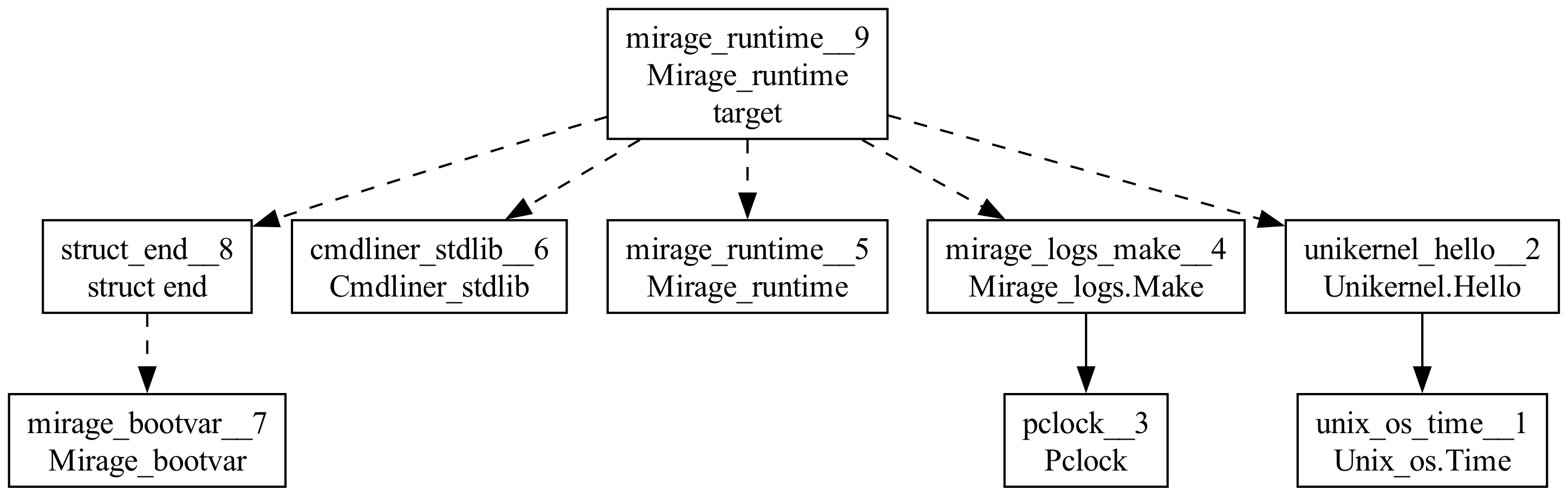
illustration is a pair of module graphs of the same source
configured for the two targets; Suresh's graph is busy (it has a
whole HTTP stack in it), so the graphs below are the previous
lecture's hello unikernel, drawn with mirage 4.8, where the time
device was still a visible node. Configured -t unix:
And configured -t hvt:
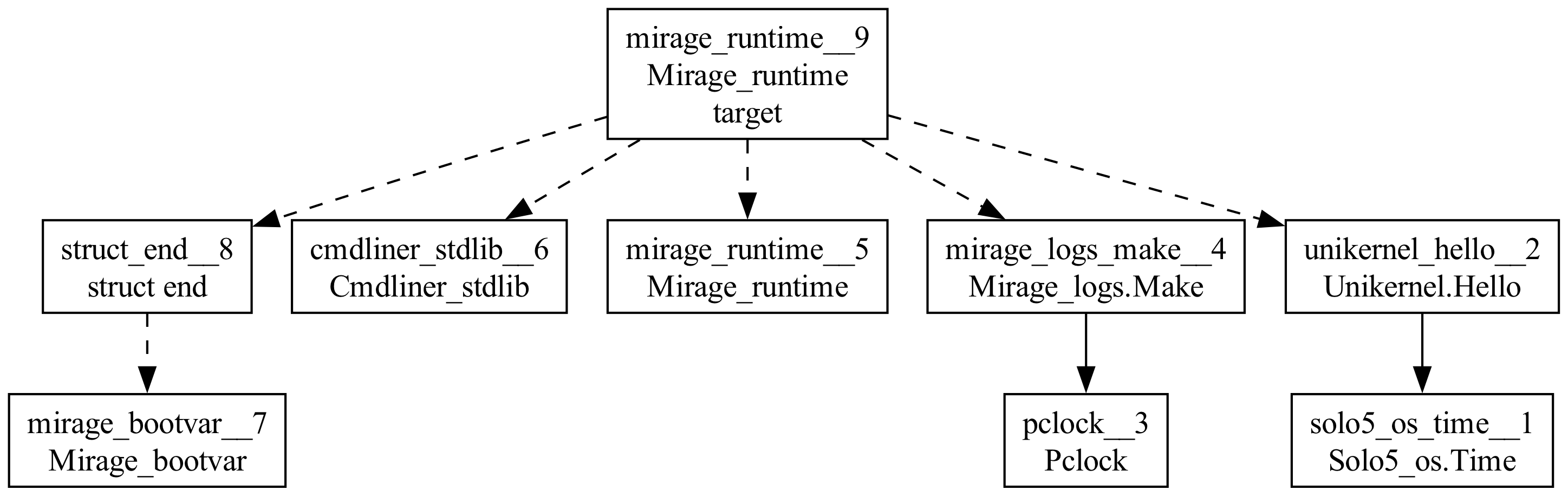
Play spot-the-difference: the two graphs are identical except for
exactly one node, bottom right: Unix_os.Time versus
Solo5_os.Time. One substituted module, everything else
untouched.
In current mirage (4.9 and later) the same comparison is even
more extreme: the ambient time device is wired at link time, so
it is not in the graph at all, and the only target-dependent
line in hello's generated main.ml is the one that enters the
backend's event loop:
let run t = Unix_os.Main.run t ; exit 0    (* -t unix *)
let run t = Solo5_os.Main.run t ; exit 0   (* -t hvt  *)
plus the package set the target selects (mirage-unix versus
mirage-solo5). Retargeting an entire operating-system backend
is one substituted module and one package choice; the application
never changes. Suresh retargets the same way, with the device
functors (the HTTP server and the network stack under it) doing
the same swap at the manifest level.
Same source, two targets: spot the difference
- One node differs:
Unix_os.TimebecomesSolo5_os.Time(graphs from mirage 4.8). - Today the swap is even smaller:
Unix_os.Main.runvsSolo5_os.Main.run, plus the target's packages.
You can try this yourself, in the course VM: the hello project from
the previous lecture is baked in at /root/m12/hello. The VM is
deliberately offline and 32-bit, so it is worth knowing which steps
work there and which do not.
What works. First, reconfigure and compare, the spot-the-difference
above: mirage configure -t hvt then grep Main.run mirage/main.ml
shows Solo5_os.Main.run; reconfigure -t unix and the same grep
shows Unix_os.Main.run. This always works, because mirage configure is pure rewiring and needs no network. Second, build and
run the unix target: after mirage configure -t unix, run make build and then ./dist/hello, and the unikernel runs as an
ordinary process, prints its log lines, and stops on Ctrl-C. This
works because the unix target compiles to bytecode, which the 32-bit
VM can do, and its dependencies were vendored into the image when it
was built.
What does not, by design. The hvt target cannot be built in the VM:
the solo5 targets compile to native code, and the 32-bit VM has no
OCaml 5 native backend (and an hvt image would in any case need the
Solo5 tender and KVM to run, which a browser cannot provide). So in
the VM, hvt is configure-and-inspect only; the running hvt boot is
the recorded one below. And do not run make depend or make all:
those re-fetch the opam overlay repositories over the network, which
the offline VM does not have. The locking and fetching were done at
image-build time, so plain make build is all you need.
dune build: the unikernel ELF
make depend locks and fetches the OCaml packages listed in
mirage/suresh-hvt.opam (MirageOS builds vendor their
dependencies into the project), and make then runs dune build.
The dune step is where the OCaml compiler does the heavy lifting:
compile unikernel.ml, compile main.ml, compile every
dependent library, link them all into one static image, run
whole-program dead-code elimination.
$ make depend
$ make
dune build --profile release --root . dist
$ ls dist/
suresh.hvt
$ file dist/suresh.hvt
dist/suresh.hvt: ELF 64-bit LSB executable, ARM aarch64,
  statically linked, with debug_info, not stripped
$ ls -lh dist/suresh.hvt
-rwxr-xr-x  1 kc kc  17M  suresh.hvt
$ strip dist/suresh.hvt          # drop debug symbols
$ ls -lh dist/suresh.hvt
-rwxr-xr-x  1 kc kc  7.6M  suresh.hvt
A few notes on what just happened:
- The output is a single ELF binary, statically linked. No
shared libraries. No dynamic loader. (It says
aarch64because this was built on an ARM host; on an x86-64 host the only change is the architecture word.) - As built it is 17 MiB, but most of that is debug symbols;
stripbrings it to ~7.6 MiB for a minimal HTTP unikernel. That is in the ballpark MirageOS quotes for serious examples; the mirage.io HTTPS server is around 10 MiB. - Separately from stripping, the linker's dead-code elimination already removed every library function the app does not reach. The cohttp library is large; only the pieces this unikernel exercises survive into the image at all.
Running it: solo5-hvt on KVM
The image is not a Linux process. It is a guest VM. To run it on a Linux host with KVM, you invoke the Solo5 tender:
$ solo5-hvt --net:service=tap0 -- dist/suresh.hvt \
      --ipv4=10.0.0.2/24 --ipv4-gateway=10.0.0.1
            |      ___|
  __|  _ \  |  _ \ __ \
\__ \ (   | | (   |  ) |
____/\___/ _|\___/____/
Solo5: Bindings version v0.10.1
Solo5: Memory map: 512 MB addressable:
Solo5:   reserved @ (0x0 - 0xfffff)
Solo5:       text @ (0x100000 - 0x4a3fff)
...
2026-06-13T06:13:32-00:00: [INFO] [tcpip-stack-direct]
   Dual TCP/IP stack assembled: ip=10.0.0.2/24
2026-06-13T06:13:32-00:00: [INFO] [application]
   suresh listening on TCP port 8080
The --net:service=tap0 flag wires Suresh's virtual network to a
tap interface on the host, and the --ipv4 arguments give it a
static address (without them it would try DHCP). KVM under the
hood creates a fresh VM, maps the ELF, jumps to its entry point,
and Suresh is up. The VM itself starts in tens of milliseconds;
boot-to-listening on this host was about 0.1 s, the rest being the
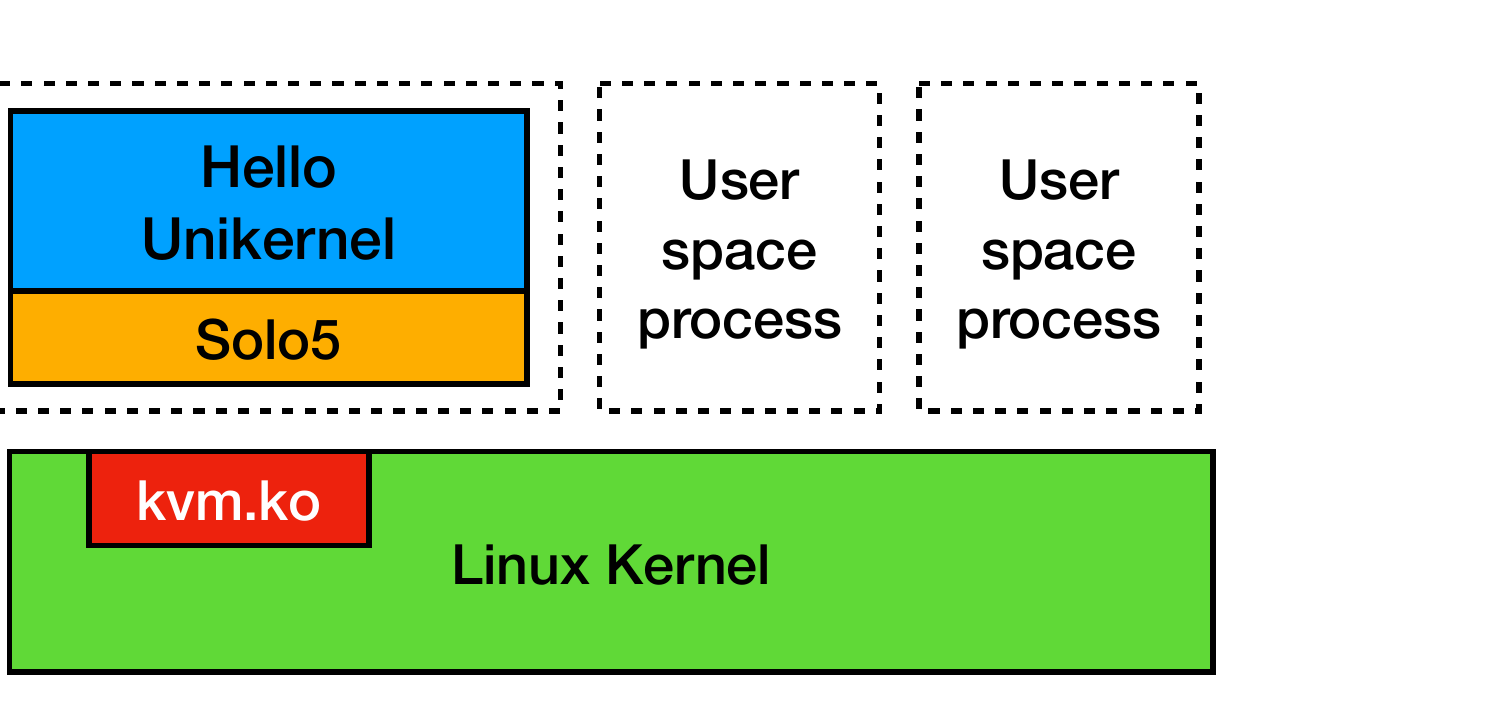
network stack coming up. The picture on the host is the one from
the background lecture: Suresh and Solo5 in their own VM, ordinary
processes alongside, the KVM module underneath:
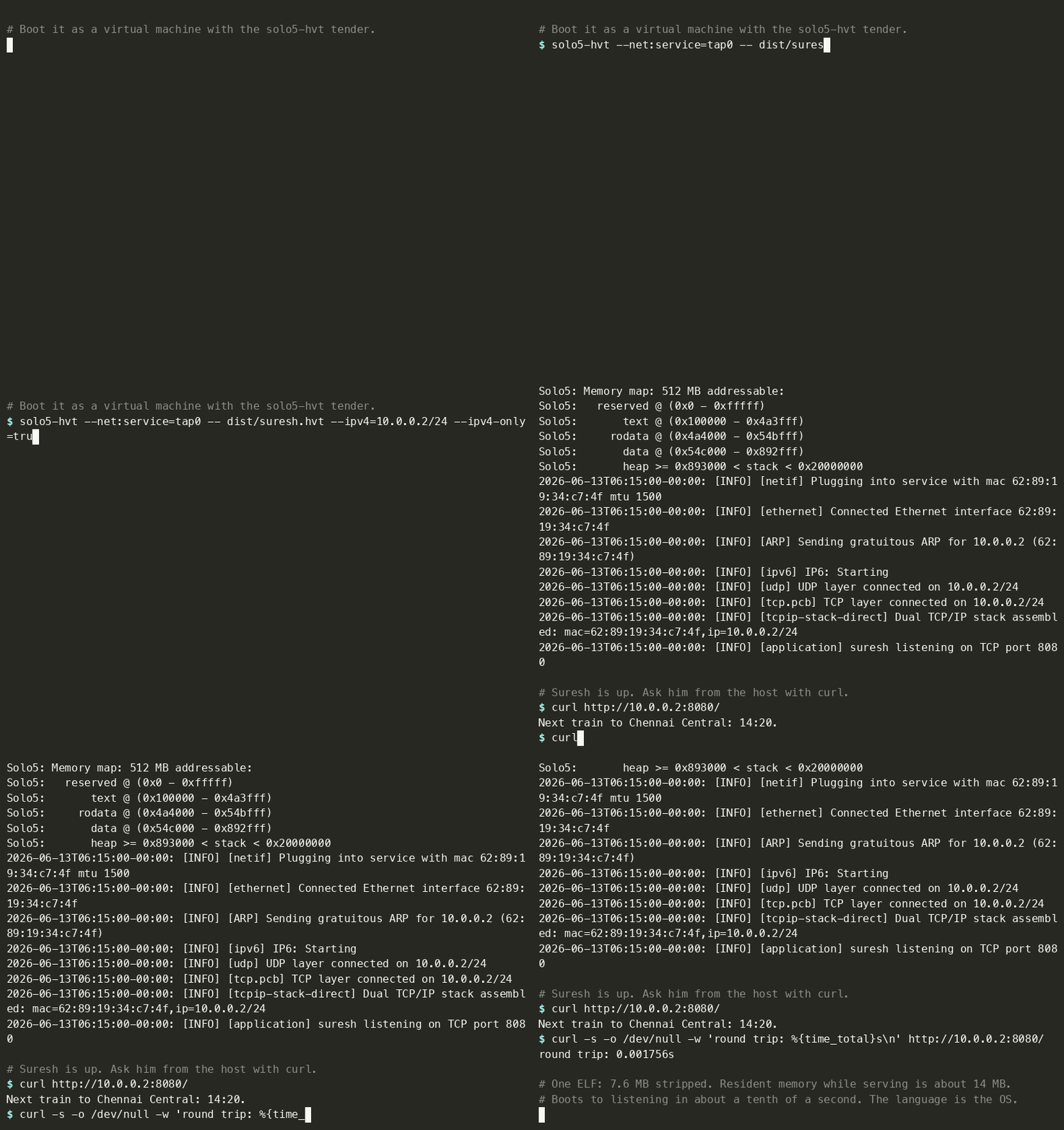
Here is the whole thing, recorded against a real solo5-hvt boot
on KVM: the two source files, mirage configure, the build, the
boot banner, and a curl answered by the running unikernel.
On the host: a guest VM beside ordinary processes
- Suresh and Solo5 are one guest VM (the dashed box).
- Ordinary user-space processes run alongside, unchanged.
- Underneath: the Linux kernel with the KVM module (
kvm.ko). - The same KVM that runs any VM; the unikernel is a tiny guest.
solo5-hvt -- dist/suresh.hvt
- KVM creates the VM, maps the ELF, jumps to its entry point.
- Boot to listening: ~0.1 s (the VM starts in tens of ms).
Testing it
From any machine that can reach the unikernel's IP, a plain
curl exercises the service:
$ curl http://10.0.0.2:8080/
Next train to Chennai Central: 14:20.
$ curl -w '%{time_total}\n' -o /dev/null -s http://10.0.0.2:8080/
0.000733
That's the whole interaction. Suresh received one TCP connection, served one HTTP request, wrote the response, and is ready for the next one. The round-trip on a local network is well under a millisecond, dominated by network latency, not by the unikernel.
Footprint
Putting the operational numbers in one place:
| Property | Suresh | Typical Linux web service |
|---|---|---|
| Binary on disk | 7.6 MiB | 50-200 MiB (interpreter + libs) |
| RAM at idle | ~14 MiB | 50-500 MiB |
| Boot time | ~0.1 s | 5-30 s (kernel + init + service) |
| Processes inside | 1 (the app itself) | dozens (init, sshd, agents, etc.) |
| Open TCP listeners | 1 (port 8080) | several (sshd, metrics, the app, ...) |
| Shell access | none | yes |
The "Suresh" column is a single unikernel image. The "Typical Linux" column is a stock cloud VM running a containerised version of the same app. By these numbers the footprint difference is roughly an order of magnitude on disk and RAM, and two orders of magnitude on boot time. The attack-surface difference points the same way: Suresh has one process, one open port, and no shell.
What a "real" deployment would add
Suresh as shown is honest about being minimal. A production deployment would add several things, each of which is its own MirageOS library:
- TLS, so the service is reachable over HTTPS, not plain
HTTP. Flip
~tls:falseto a~tls:trueconfiguration inconfig.ml, ship a certificate and key asmirage-kvread-only key-value stores, and the build pulls inocaml-tls(the rigorous-engineering case study of the MirageOS lecture). - Persistent storage, if Suresh needs to remember anything
across restarts.
mirage-block(the Solo5 block device) plus a tiny on-disk format (orirmin, the MirageOS git-style store) covers this. - Observability: structured logs (via
Logs), metrics (metrics), tracing. Suresh already usesLogs; the host captures its stdout the same way it captures any container's stdout. - Configuration: where Suresh currently has a hard-coded port
and train time, a real service would read these from
mirage-runtimeboot arguments, set via thesolo5-hvtcommand line.
None of these are conceptually different from what you would
build into a Linux service. The difference is that each one is
an OCaml library linked into the same single binary; there is no
/etc/suresh/suresh.conf and no suresh.service unit file.
And Suresh would not be deployed by hand. The 2026 unikernel
ecosystem has an operations layer of its own: albatross
(Robur's deployment daemon, with its mollymawk web UI) manages
fleets of unikernels: starting, monitoring, streaming consoles,
collecting metrics. If your organisation lives in Kubernetes,
urunc runs suresh.hvt as if it were a container, behind the
same kubectl you already use. And Robur's reproducible-builds
service demonstrates the supply-chain endgame: anyone can rebuild
the exact binary from source and compare hashes. One ELF turns
out to be a very convenient unit of operations.
Closing thoughts
Suresh is the smallest unit of running software the unikernel approach delivers: one OCaml file, one manifest, three build commands, one ELF, one VM. There is no operating system in the ordinary sense between the language and the silicon. The language is the operating system.
The claim has two halves. The first is the appeal: a single auditable binary, fast boot, small attack surface, and the safety story from all eleven previous modules pushed down into the OS layer. The second is the constraint: this approach works for narrow, single-purpose network services. It is not a replacement for the operating system on your laptop or for the kernel running your database cluster's storage nodes. The trade is a sharp one and it pays off in exactly the place we have been pointing at: long-running, single-purpose, security-sensitive network services.
That is this module: from the iceberg of the opening lecture to a 7.6 MiB binary that boots in a fraction of a second.
Where to go from here
Suresh is also the last worked example of the course, so this is
the right place for a forwarding address. If the unikernel idea
caught you, the path is concrete: clone
mirage-skeleton and
work through its tutorial/ unikernels (Suresh is a light disguise
over its HTTP examples), then the documentation and blog at
mirage.io. If you want to deploy one for
real, Robur publishes both production
unikernels and the operational tooling around them, and their
work is a good model of what professional MirageOS engineering
looks like.
For OCaml beyond this course: ocaml.org is the hub for the manual, the package ecosystem, and the books (including Real World OCaml, free online). The community is welcoming and active in two places: the discuss.ocaml.org forum for longer questions and announcements, and the OCaml Discord for live chat (the invite is linked from ocaml.org's community page). The high-performance extensions from Module 11 have their own home at oxcaml.org. And these course materials live at fplaunchpad.org, which is where to go for more functional-programming teaching.
Twelve modules ago the course started with let. It ends with an
operating system whose every layer you can now read: the data
types are Module 4's, the pattern matches are Module 5's, the
functors are the module system you sealed queues with, the tests
are Module 9's, the safety argument is Modules 10 and 11's, and
the whole thing boots in a fraction of a second. Functional
programming is not a paradigm you visit; it is a toolkit you
build systems with. Go build one.
Activity
Suresh currently answers every request with the plain-text
response "Next train to Chennai Central: 14:20." Give it a second
endpoint. The mock Http module below stands in for the
platform's HTTP server (the real Cohttp_mirage needs a network;
the mock needs only a record), with the same respond_string
shape Suresh's handler uses.
Write handler : string -> Http.response so that:
- path
"/"keeps Suresh's existing behaviour: statusOK, content type"text/plain", body"Next train to Chennai Central: 14:20."; - path
"/api/next"returns the same information as JSON: statusOK, content type"application/json", body{"destination":"Chennai Central","time":"14:20"}; - any other path returns status
Not_found, content type"text/plain", body"not found".
On the footprint table for Suresh (suresh.hvt, ~7.6 MiB on disk,
~14 MiB of RAM, ~0.1 s boot time), which of the four following
statements best explains why these numbers are so much smaller
than the corresponding numbers for the same service deployed as
a containerised Linux process?
- Solo5 is a faster hypervisor than Linux KVM.
- The unikernel skips the TCP/IP stack entirely.
- Dead-code elimination omits the guest OS and unused libraries.
- OCaml binaries are inherently smaller than any other language's.
Why: KVM is the same hypervisor in both cases; the
unikernel keeps its full TCP/IP stack (in OCaml). The real
shrinkage comes from the unikernel containing only what its
single application uses, with whole-program DCE stripping the
rest. A container image still ships a userland: an init
process, a shell, a libc, several daemons, often the dynamic
loader. None of that is in Suresh.
Show reference solution
Q1: the shape is a match path with over the three cases, each
arm one Http.respond_string call: "/" returns the existing
text, "/api/next" returns the JSON string with
~content_type:"application/json", and a wildcard returns
~status:Http.Not_found. In the real project this whole change
lives in unikernel.ml; the manifest already provides the HTTP
server, so no mirage configure rerun is needed, just make.
Reconfigure only when the library set changes.
Q2: Suresh is small because the image contains only the libraries the application reaches (whole-program dead-code elimination), with no Linux guest, no userspace daemons, and no shell. A container still ships a userland.
Common pitfalls
Pitfall 1: "Where do I install Suresh?" You do not install it;
you boot it. solo5-hvt -- dist/suresh.hvt starts a fresh VM. The
deployment story is "ship the ELF to the host, ask the host's
deployment system (systemd, kubernetes, nomad) to run it."
There is no package manager step for Suresh itself.
Pitfall 2: "What if Suresh crashes?" It exits. The host's
deployment system starts a new copy. Because boot time is a
fraction of a second, this is operationally indistinguishable from
the old copy "recovering." There is no rescue shell, no
/var/log to inspect, no live debugger inside the unikernel.
Diagnostics live in the host-captured stdout logs and in any
metrics the unikernel published.
Pitfall 3: "Suresh has no shell. How do I log in?" You do not.
For development you can rebuild Suresh, target mirage configure -t unix, and run it as a plain Linux process for interactive
debugging. For production, every introspection has to be through
the unikernel's own networked endpoints (metrics, structured
logs, a /health HTTP endpoint).
Pitfall 4: "Can Suresh talk to a database?" Yes, as long as the database is reachable over the network and there is an OCaml client library for it (postgres, redis, several others all exist). It cannot talk to a Unix-domain socket on the host; there is no host kernel to expose one.
Reading
- MirageOS project home: https://mirage.io/
- mirage-skeleton, the canonical starter projects: https://github.com/mirage/mirage-skeleton
- Robur, a non-profit deploying MirageOS in production: https://robur.coop/
- Solo5, the unikernel tender (see the virtualisation lecture): https://github.com/Solo5/solo5
- Suresh itself is a course-built example. The closest real
starting points are
mirage-skeleton's HTTP example (applications/static_website_tls, the cohttp static-website unikernel) and itstutorial/unikernels.
Sources
This lecture's prose, code excerpts, and quizzes are original to
this course. The "Suresh the Stationmaster" framing and the
next-train service are invented for this course as a tiny worked
example; the specific code skeleton above is built around the
standard mirage-skeleton HTTP examples and follows the same
pipeline KC Sivaramakrishnan's January 2025 IIT Madras talk
Towards smaller, safer, bespoke OSes with Unikernels uses for
the Hello Unikernel walkthrough (slides 31 to 35). The footprint
numbers and the boot transcript are measured from a real
solo5-hvt boot of this unikernel on a Linux+KVM host (aarch64,
mirage 4.11, Solo5 v0.10.1); the mirage.io HTTPS server's 10 MiB
figure is from the talk. See
LICENSES.md
at the repository root for the full source posture.