MirageOS Unikernel Background
Last lecture ended with a question: do we really have to ship the entire monolithic kernel with every application, even when the application only needs a sliver of it? This lecture is the whole of the answer's background: three ideas, each old and respectable on its own, that MirageOS combines into something new.
The first idea is the library OS: take the kernel apart and put
it back together as ordinary libraries that the application links,
the same way it links libssl or libm. The second is
virtualisation: run that library OS as a guest on a hypervisor,
which restores the protection the library OS gave up and takes the
device drivers off its hands. The third is the programming
language: with no hardware boundary left inside the image, the
language's safety guarantees are what keep one part of the image
from corrupting another, and after eleven modules you know exactly
which language we have in mind.
The artifact these three ideas produce is called a unikernel: one application plus exactly the OS libraries it needs, compiled and linked into a single bootable image. This lecture builds the three ideas; the next one shows MirageOS assembling them, and the last one walks one unikernel from source to running VM.
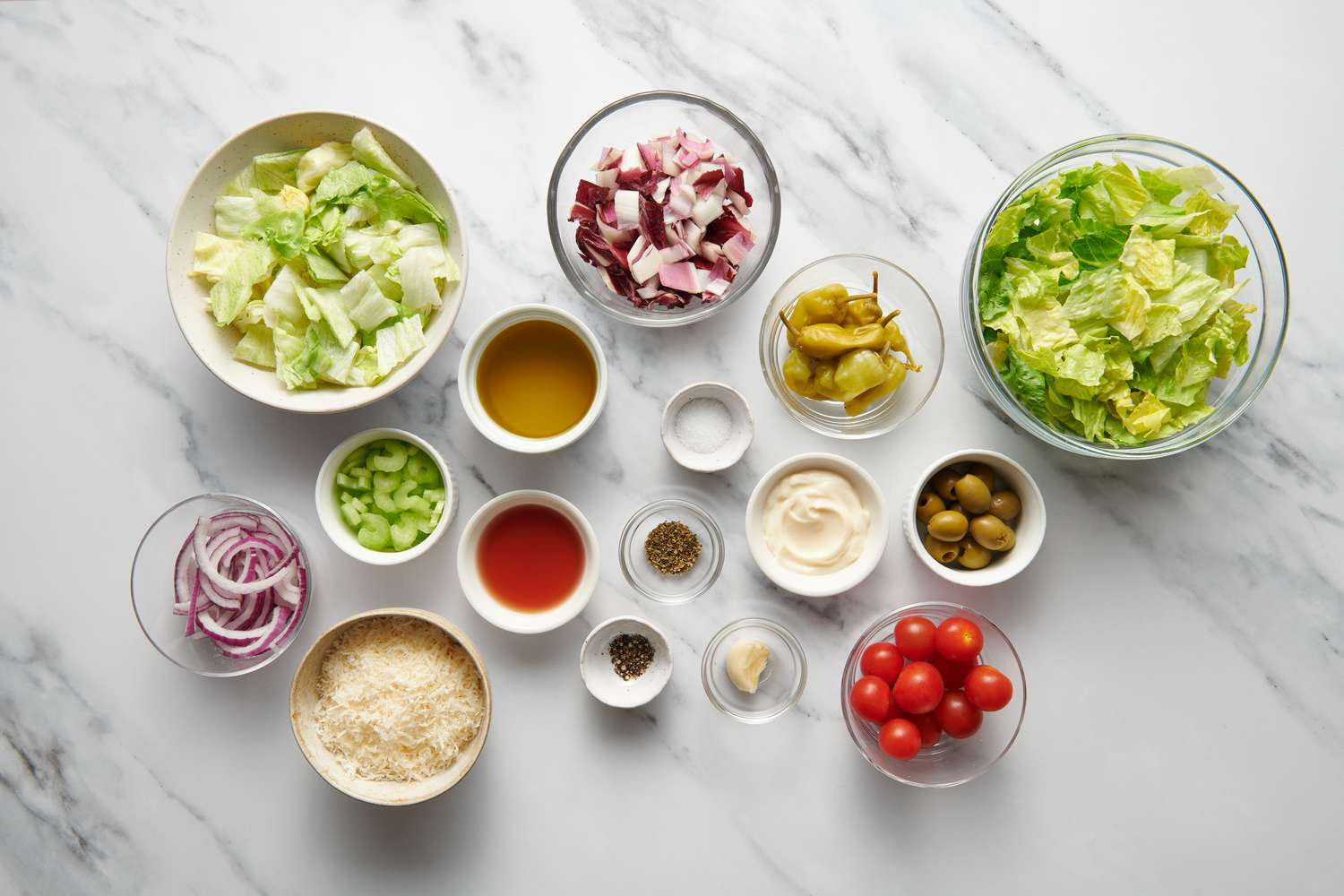
A word on the module's running metaphor. The answer is a recipe: three ingredients, prepared separately, then tossed together into one dish. This lecture preps all three; MirageOS is the salad.
Where we are
- The previous lecture: kernels are huge, trusted computing bases (TCBs) are huge, security suffers.
- This lecture, the three ingredients of the answer:
- the library OS: the kernel as libraries you link.
- virtualisation: a hypervisor restores protection and takes the drivers.
- the language: safety inside the image. Ours is OCaml.
- Together they produce a unikernel: one app + its OS libraries, one bootable image.
- The module's recipe: three ingredients, one salad. This lecture preps; the next one tosses.
Ingredient 1: the kernel as a library
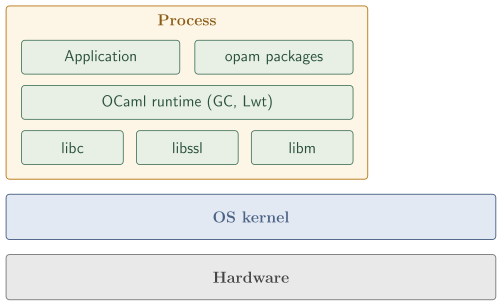
Recall the conventional stack from last lecture. At the top, your application. Below it, configuration files, the language runtime, shared libraries, and then the kernel sitting between you and the hardware as an ambient supervisor. The user-kernel boundary is a hard line: above it, your code runs with low privilege; below it, kernel code runs with full hardware privilege. Crossing the line takes a syscall: a controlled, privileged transition.
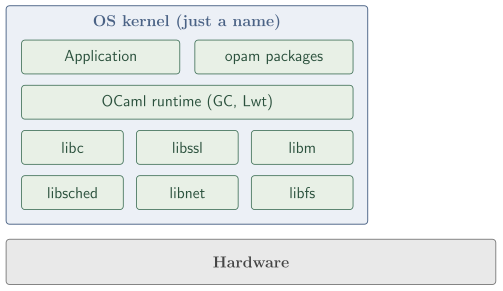
In a library OS, that horizontal line disappears. The kernel functionality, broken into libraries, is inside your program's address space. Drawn as boxes, the picture is one big container labelled "kernel" (in name only) with the application, the language runtime, the shared libraries, and the new libraries (the scheduler, the network stack, the storage stack, the device drivers) all inside it. There is no separate layer underneath. The CPU executes everything in one address space, in one privilege mode.
Conventional kernel (recap)
- A hard line between process and kernel.
- the kernel is a separate, privileged band.
- Every device touch goes through a syscall.
Ingredient 1: the library OS
- One address space, one mode.
- "Kernel" is just the name for the union of the libraries.
- libsched, libnet, libfs are linked like libssl.
The conceptual move is small but the practical consequences are large. Three of them stand out:
- Single address space. All code, including what used to be "kernel" code, runs in the same virtual-address space. A pointer from the application can reach into the network stack; a pointer from the network stack can reach into the application. There is no MMU-enforced boundary between them.
- Single calling convention. A network send is no longer a syscall with register-marshalling and a trap into ring 0; it is a function call. The compiler can inline across it. The cost of "crossing the kernel" is now the cost of "calling the next function," which is essentially free.
- Application-selected libraries. The application picks which libraries to link: the memory allocator (the GC, for OCaml), the scheduler, the network stack, a file system only if it stores anything, the device drivers. If it needs only TCP/IP and no filesystem, it links only the network library. The "kernel" that ends up in the binary is only the parts the application uses.
The last point is the one that directly addresses the iceberg from last lecture. A library-OS application that does not use a USB stack does not have a USB stack in its image. The runtime shrinks to what the application actually exercises, and so does the attack surface: the trusted computing base is now the size of what you link, not the size of everything anyone might link.
What changes when the kernel is a library
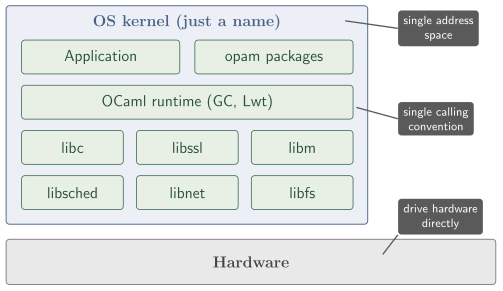
- Single address space. No MMU wall.
- Single calling convention. A send is a function call, not a syscall.
- The app picks its libraries. No disk used means no
filesystem shipped.
- a smaller image is a smaller TCB.
The "kernel" in the binary is only the parts the app uses.
This is not a new idea, and its history explains the design of everything that follows. In the 1990s two academic projects built serious library OSes: Nemesis (Cambridge and Glasgow, built for multimedia workloads that needed predictable latency) and Exokernel (MIT; the SOSP 1995 paper argues the OS should only multiplex hardware securely and let applications bring everything else as libraries). Both ran; both produced theses and papers; neither displaced the monolithic kernel. The killer was not the concept but the device drivers: every device in the world needs a driver, the Linux community maintains them collectively, and no research group can keep pace with that volume on its own. Later industrial efforts (Microsoft's Drawbridge, the Graphene/Gramine line, NetBSD's rump kernels) found security-sensitive niches for the same idea, and one production system, ClickOS (NEC Labs and Politehnica Bucharest, NSDI 2014), showed a library-OS guest doing line-rate network middlebox work in a few megabytes per instance. The pattern across all of them: the library OS works where the workload is narrow, and it needs something else to own the drivers.
So the honest balance sheet for ingredient 1 has real wins (application-level hardware control, a TCB the size of what you link, syscall-free performance) and two cons we cannot wave away. The first is the one consequence 1 above already implied: with no MMU wall inside the image, a wild pointer in the application can corrupt the scheduler's run queue or the network stack's buffers, and nothing in hardware stops it. The second is the historical killer: every driver has to be rewritten for the library OS's own conventions, and no project outside the Linux mainline can sustain that.
Ingredient 2: virtualisation
Virtualisation is the technology that lets multiple operating systems run on the same physical machine, each believing it has the whole machine to itself. The piece of software that maintains that illusion is a hypervisor (equivalently, a Virtual Machine Monitor, VMM); each guest runs in a virtual machine with what looks like its own CPU, memory, disks, and network cards. The idea goes back to IBM in the 1960s, the modern era starts with Xen and the Art of Virtualization (SOSP 2003), and every cloud provider today runs customer workloads exactly this way: your EC2 instance is a guest OS on a hypervisor. Hardware support added in the mid-2000s (the next section's subject) made the illusion cheap: a guest costs only a few percent over bare metal.
This course assumed no operating-systems background, so it is worth pinning down the two hardware mechanisms virtualisation builds on. Both predate it by decades.
Privilege levels. The CPU runs in one of a small number of privilege levels; x86 calls them rings. Ordinary code runs in ring 3, where it cannot touch devices or change memory mappings. The kernel runs in ring 0, where it can do everything. The only way from ring 3 to ring 0 is a controlled trap: a system call switches the CPU into ring 0 at a kernel-chosen address, the kernel does the privileged work, and execution returns. The kernel/user split from the opening lecture is not a software convention; rings are how the hardware enforces it.
Page tables. Every memory access a process makes goes through a translation table, set up by the kernel and walked by the hardware, that maps the process's virtual addresses onto physical memory. A process cannot so much as name a page its table does not map, which is why one process cannot read another's memory.
What the 2005 extensions add: one more level, for the hypervisor. Intel's VT-x (2005) and AMD's AMD-V (2006) add a mode below ring 0 (informally, the hypervisor's "ring -1") and one clause's worth of new vocabulary: extended page tables (EPT), a second, hardware-managed layer of translation that maps each guest's "physical" memory onto real machine pages. With both in place, a guest kernel runs in its own ring 0 and manages its own page tables, never noticing that its physical memory is itself virtual. The hypervisor controls kernels exactly the way a kernel controls processes: it sits one privilege level below, owns the lower layer of translation, and privileged operations trap down to it. (Before these extensions, software-only virtualisation existed, think VMware in the late 1990s, but it required heroic binary translation; after them, a guest costs only a few percent over bare metal.)
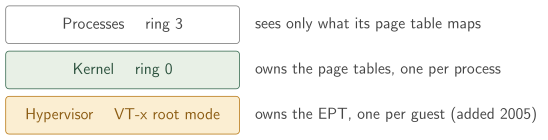
What the hardware provides
- A kernel controls processes with rings and page tables.
- VT-x (2005): the same two mechanisms, one level down.
- EPT (extended page tables): a second translation layer, one per guest, that isolates each VM's memory.
- The hypervisor controls kernels the way a kernel controls processes.
The textbook taxonomy splits hypervisors in two. A type 1 (bare-metal) hypervisor runs directly on the hardware, and every operating system on the machine is a guest above it; Xen, VMware ESXi, and Microsoft's Hyper-V are the classic examples, and this is the shape clouds run. A type 2 (hosted) hypervisor is an application on a conventional host OS, borrowing the host's drivers and scheduler; VirtualBox and VMware Workstation are the familiar examples, and this is the shape developer laptops run.
The hypervisor you will actually meet is Linux KVM (Kernel-based Virtual Machine), and it blurs the taxonomy in an instructive way: KVM is a kernel module that exposes the hardware extensions to userspace, and loading it turns the running Linux kernel itself into a type 1 hypervisor. The machine keeps being an ordinary Linux box, but any Linux process can now create and run a VM. For each VM there is one host userspace process holding the guest: conventionally QEMU, the program that emulates whatever hardware the guest expects (a PCI bus, a disk controller, a serial port) and asks KVM to run the guest's code on the real CPU. The guest's kernel and applications run inside that process, isolated by the EPT; the KVM module in the host kernel does the privileged work. KVM ships with mainline Linux, and it is what every major cloud runs underneath its Linux VM offerings, which is why "unikernel in production" will almost always mean "on KVM" in the next two lectures.
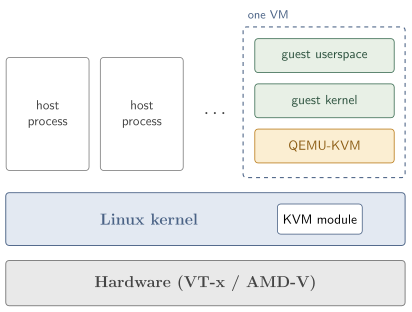
Linux KVM, layered
- A VM is held by one host process (QEMU); the EPT isolates
the guest.
- QEMU emulates whatever hardware the guest expects.
- The KVM module in the host kernel is the privileged piece.
- Ships with mainline Linux; underlies every major cloud.
Solo5: a tender for unikernels
A full QEMU-KVM process is built to host arbitrary guests: Windows, a Linux distribution, anything that expects a PCI bus, a BIOS, a CD-ROM drive. A unikernel needs none of that, and there is a piece of software built for exactly this gap: Solo5, the tender that production MirageOS deployments run on. A tender is the small host-side program that tends one unikernel: it loads the image, sets up the VM (or sandbox), attaches the virtual network and block devices, and jumps to the entry point. No PCI emulation, no BIOS, no CD-ROM; orders of magnitude less code than QEMU.
The interface Solo5 offers the unikernel is correspondingly tiny: console output, a clock, network read/write, block read/write, yield, and exit. Six hypercalls (the guest-to-tender call, the VM analogue of a syscall) are the entire ABI, small enough to audit in an afternoon; compare the hundreds of calls in the Linux syscall surface.
Notice what this does to the library-OS driver burden. The unikernel does not drive a network card; it calls net read and net write, and the tender, with the host kernel's existing driver ecosystem underneath it, does the hard work of talking to the real hardware. The guest ships no hardware drivers at all. The driver problem that kept Nemesis and Exokernel in the lab evaporates.
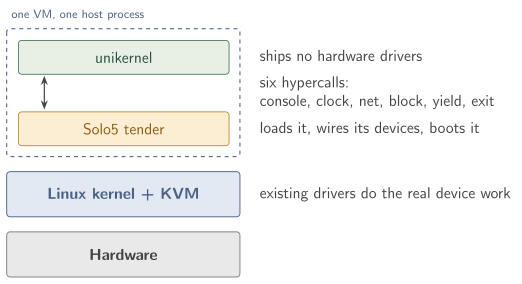
Solo5 has several backends behind that one ABI:
| Backend | Isolation mechanism | Typical use |
|---|---|---|
solo5-hvt |
KVM virtual machine | The canonical production target on Linux. |
solo5-spt |
Linux seccomp filter | Development; containerised environments where KVM is unavailable. |
solo5-muen |
Muen separation kernel | High-assurance / formally verified hosts. |
solo5-xen |
Xen hypervisor | Xen-based clouds and historic Xen deployments. |
(seccomp is a Linux facility that restricts a process to an
allow-list of system calls, so solo5-spt runs the unikernel as
a tightly sandboxed ordinary process, no hypervisor needed.) The
same unikernel image works against any of them; picking the backend
at build time is the next lecture's specialisation story. By
default, picture solo5-hvt on KVM: that is what production
deployments overwhelmingly use.
Solo5: the tender for unikernels
- A tender: the small host-side program that tends one unikernel. No PCI emulation, no CD-ROM, no BIOS.
- The whole guest ABI is six hypercalls.
- a hypercall is the VM analogue of a syscall.
- The guest ships no hardware drivers: the host's existing drivers do the real work.
- Backends:
solo5-hvt(KVM, the production default),solo5-spt(sandboxed Linux process), Xen, muen.
What the first two ingredients buy
We can now answer the question the activity of this lecture opens with: if a library OS has no internal MMU protection, how is it secure? The answer is that between unikernel images, the hypervisor's guest boundary provides isolation just as strong as the conventional user-kernel boundary, and arguably stronger, because the hypervisor's API surface (six hypercalls) is so much smaller than the Linux syscall surface. If you deploy two unikernels on the same host, a memory bug in unikernel A cannot reach unikernel B: the EPT does not map B's pages for A. Compare two processes on one Linux kernel, where a single kernel CVE that escalates privilege from process A compromises the whole machine. (This is also what separates VMs from containers: containers share the host kernel, so a kernel CVE compromises every container on the host; a guest bug stays inside its guest.)
The satisfying way to record the progress is to take the two cons from the "Cons of a library OS" slide and strike through what no longer holds:
Cons: no internal protection,
and drivers all need to be rewritten.
The struck-out half is gone: the tender's tiny device interface is all the unikernel ever drives, and the host owns the real hardware. The surviving half, no protection within one image, is precisely what no hypervisor can fix, because the hypervisor sees only the outside of a guest. That is the third ingredient's job.
Ingredient 3: the language
Inside a single unikernel image there is no MMU wall between the application and the network stack, between the network stack and the TLS library, between the TLS library and the crypto primitives. The unikernel runs at the guest's highest privilege level; a wild pointer in the TLS state machine could, in principle, scribble over the scheduler's run queue or hand an attacker the keys. The hypervisor cannot help; it does not see inside a guest.
So a safe language has to do the job the MMU used to do, and this is where the course you have just taken becomes the ingredient. You know from the memory-safety module why this works: OCaml's GC makes use-after-free a category error, the type system makes type confusion unexpressible, exhaustive matching removes the null-dereference class, and immutability-by-default shrinks the aliasing surface. The slogan for this module: virtualisation isolates the unikernel from the world; the language isolates the inside of the unikernel from itself. Both are necessary; neither is sufficient alone.
A small, audited unsafe core
Even a safe language needs an unsafe core: the runtime itself is C, and a few primitives genuinely have to talk to hardware or run in constant time. The honest design is not "no unsafe code" but "a small, audited unsafe core, with everything else in the safe language." For a MirageOS unikernel the arithmetic is: the OCaml runtime (about 30 to 40 thousand lines of C, maintained by the upstream OCaml team), Solo5 (about 5 thousand lines per backend, maintained by the Solo5 project), and a few hundred lines of machine-checked crypto C that we will meet in the next lecture. Call it 40 thousand lines of C, against the 30 million of a Linux TCB. Same memory-safety risk per line of C; a thousand times fewer lines.
OCaml's GC inside a unikernel
One language-level design point makes "OCaml as the OS" practical. The OCaml garbage collector is compacting, incremental, and generational: the minor heap is a small contiguous bump allocation region, the major heap is swept in bounded slices, and a single pause stays small. Push that into a unikernel and three properties travel well:
- Bounded pauses. No stop-the-world rescan of the world in the common case; latency-sensitive network services tolerate the GC.
- No kernel allocator needed. A library OS has no
kmalloc(the kernel's internalmalloc) to lean on. OCaml's GC manages its own heap on top of one static memory region that Solo5 hands the image at boot, and that is all it needs. - Statically linked, dead-code eliminated. The GC lives in the unikernel image next to the application; link-time dead-code elimination strips what the application never uses.
A language with a heavier, less predictable GC would struggle in this regime; a language with no GC at all pushes manual memory management back into the application. OCaml's collector is the middle path that fits the unikernel constraints.
One last piece of context, for the chapter rather than the deck: the position this module takes, "write the OS layer in a memory-safe language," stopped being a radical one some years ago. The CISA/NSA/FBI joint publication The Case for Memory Safe Roadmaps (December 2023) and the White House ONCD press release Future Software Should Be Memory Safe (February 2024) both ask industry to default to memory-safe languages at exactly the layers this module is about. We saw the underlying CVE statistics in the memory-safety module; the policy documents are linked from there for the curious. For this course the point is simply that the third ingredient is not exotic: it is where the industry is being told to go, and you already speak the language in question.
Activity
A library-OS application links the network library directly into its image and drives the network card from inside its own address space. A buggy network-library function dereferences a wild pointer.
Compared to the same bug in the equivalent monolithic-Linux setup (where the buggy code is a kernel module), what is the practical difference?
- On Linux the bug is masked by user-kernel separation; in the library OS the bug is masked by the language runtime.
- Linux can harm other processes; library-OS failure stays in one unikernel.
- In both cases the bug is contained to one process.
- In both cases the bug brings down the whole machine.
Why: the kernel-module bug on Linux can take the kernel down, which takes every process with it. The library-OS bug only affects this one VM, which is a win on the isolation axis between applications; but inside the library OS there is no MMU wall, so the bug can corrupt other parts of that unikernel freely. The upshot: virtualisation gives us isolation between unikernels, and the language gives us safety within a unikernel.
The library-OS cons were: no internal kernel protection, and device drivers all need to be rewritten. Which of the following best describes how adding virtualisation changes those cons?
- Both cons are eliminated entirely; with a hypervisor, every memory access inside the guest is checked.
- Both cons remain; virtualisation only affects performance.
- The hypervisor separates guests and supplies host drivers, but not internal isolation.
- Virtualisation eliminates the driver problem but makes the internal-protection problem worse.
Why: the hypervisor isolates guests from each other, not parts within one guest; for protection inside one unikernel we need the language's type and memory safety. The driver problem is reduced to driving the host's abstract virtual devices, which is feasible once and for all. Library OS plus virtualisation is deployable; the language is what makes the inside of the image trustworthy too.
Show reference solution
Q1: a library OS contains a fault to its own unikernel (no cross-process blast radius), but inside that unikernel there is no MMU wall. The between-unikernel gap is closed by virtualisation; the within-unikernel gap by the language.
Q2: the hypervisor closes the cross-unikernel isolation gap, and handing real devices to the host closes the driver-burden gap; protection within one unikernel is the language's job, which is why the third ingredient is OCaml and not another hypervisor feature.
Common pitfalls
Pitfall 1: "Library OS = microkernel." No. A microkernel moves the OS into user-space processes, with IPC between them; the kernel itself shrinks but the user-kernel boundary stays. A library OS removes the kernel as a separate component entirely and links OS functionality directly into the application's address space.
Pitfall 2: "Containers are basically library OSes." Containers share the host kernel. The whole kernel is still there; containers just give each application a different view of the userspace. A library OS has no host kernel at all, and (run as a guest) does not share a kernel with anyone.
Pitfall 3: "A VM is just a process." Functionally similar from the outside, structurally different. A process trusts the host kernel completely and talks to it through hundreds of syscalls; a guest trusts the hypervisor and talks to it through a handful of hypercalls. The size of the interface is the size of the attack surface.
Pitfall 4: "Rust would be better." Rust is also fine; it is in the same memory-safe bucket, and unikernel projects exist for it too. The reasons MirageOS is in OCaml are partly historical (the Cambridge community that built Xen also built Mirage), partly ecosystem (the libraries you will see next lecture), and partly fit: a GC'd functional language with a strong module system turns out to be a very good way to assemble an OS, as the next lecture shows. Neither language needs to be wrong for the other to be right.
What's next
The ingredients are prepped. The next lecture tosses the salad: MirageOS itself, its build pipeline from manifest to bootable ELF, the OCaml library ecosystem that replaces the kernel's subsystems, and the sense in which the module system you learned in the functional half literally assembles the operating system. The final lecture then builds and boots one complete unikernel, end to end.
Reading
- Engler, Kaashoek, O'Toole, Exokernel: An Operating System Architecture for Application-Level Resource Management, SOSP 1995: https://pdos.csail.mit.edu/papers/exokernel-sosp95.pdf
- Barham et al., Xen and the Art of Virtualization, SOSP 2003: https://www.cl.cam.ac.uk/research/srg/netos/papers/2003-xensosp.pdf
- Solo5, the unikernel tender: https://github.com/Solo5/solo5
- The MirageOS docs page on the library-OS idea: https://mirage.io/docs/
Sources
This lecture's prose, worked examples, and quizzes are original to
this course. The three-ingredient framing, the kernel-as-libraries
architectural pictures, and the Solo5 storyline follow KC
Sivaramakrishnan's January 2025 IIT Madras talk Towards smaller,
safer, bespoke OSes with Unikernels, slides 8 to 23. The Nemesis,
Exokernel, ClickOS, and Xen references are well-established
academic-literature pointers. See
LICENSES.md
at the repository root for the full source posture.